


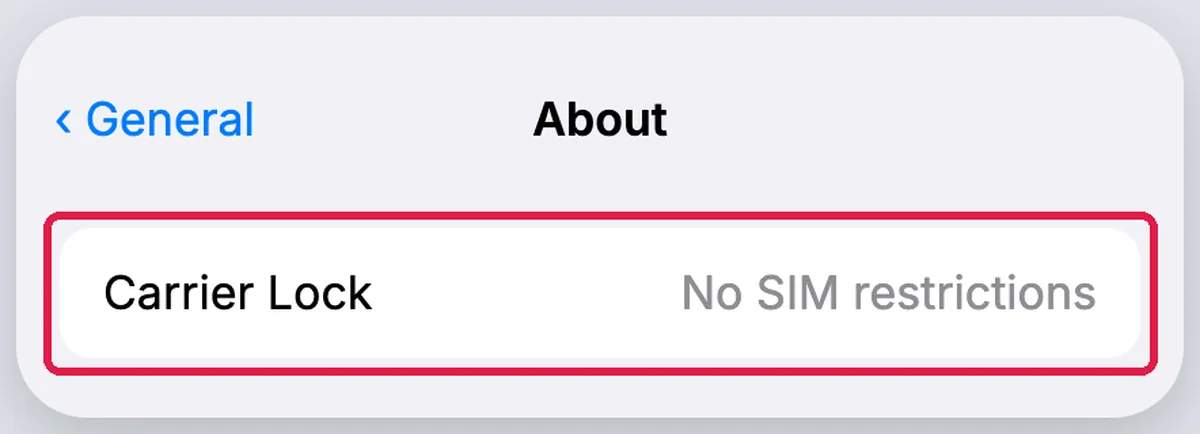
If “No SIM restrictions” appears next to Carrier Lock under Settings > General > About, your iPhone is unlocked, according to Apple. Android has no single path, so the answer to how to check if my phone is unlocked depends on the brand. AT&T’s guide says Samsung phones released after September 1, 2025 show Network lock status under Connections > More connection settings. On a Pixel, a network scan that shows networks from only one carrier means the phone is likely locked.
According to the Federal Communications Commission (FCC), with many providers, unless you bought a phone specifically sold as “unlocked”, you should presume it is locked. That makes the check worth running before you switch carriers, buy a used phone or plan to keep a US number abroad. Apple separates this from a forgotten passcode, which needs a passcode reset rather than the carrier unlock steps.
Before you start: Have the phone powered on and open to the home screen, and keep your carrier account login handy for the account check.
Key Takeaways
- Apple says an iPhone is unlocked if “No SIM restrictions” appears next to Carrier Lock in Settings > General > About.
- Per AT&T, Samsung phones released after September 1, 2025 show Network lock status under Settings > Connections > More connection settings, while older models are checked through the Service provider software version.
- With automatic network selection off, a Pixel that shows networks from only one carrier is likely locked to that network.
- The FCC says to presume a phone is locked unless you bought it specifically sold as “unlocked”.
- T-Mobile postpaid devices must be active for at least 40 days on the requesting line, AT&T requires a device bought more than 60 days ago, and Verizon prepaid devices stay locked until 365 days of paid and active service.
- An FCC order adopted January 12, 2026 granted Verizon a waiver of the rule requiring it to unlock handsets 60 days after activation.
- Within 2 business days of a request, carriers will unlock an eligible device, ask the manufacturer to unlock it, or explain why it does not qualify.
How to Check If Your iPhone Is Unlocked
Apple says you can find out if your iPhone is locked in Settings > General > About. If “No SIM restrictions” appears next to Carrier Lock, your iPhone is unlocked. AT&T’s guide adds the opposite reading. If Carrier Lock says SIM locked, your device is locked.
- Open the Settings app.
- Tap General, then About.
- Scroll to Carrier Lock and read the line next to it.
The whole check takes 3 taps from the home screen. Apple lists this Carrier Lock check for iOS 14 and later; on iOS 13 or earlier, it says to contact your carrier to confirm the unlock was applied, then restore your iPhone to factory settings. T-Mobile’s support page gives the same path and the same reading. If Carrier Lock says No SIM restrictions, your iPhone is unlocked.
What if Carrier Lock does not say No SIM restrictions?
If you don’t see the “No SIM restrictions” message under Carrier Lock, Apple says to contact your carrier. Apple can’t unlock your iPhone for use with a different carrier; only your current carrier can. Write down the exact wording on the screen before you call, so you can read it to the support agent.
How to Check If My Phone Is Unlocked on Android
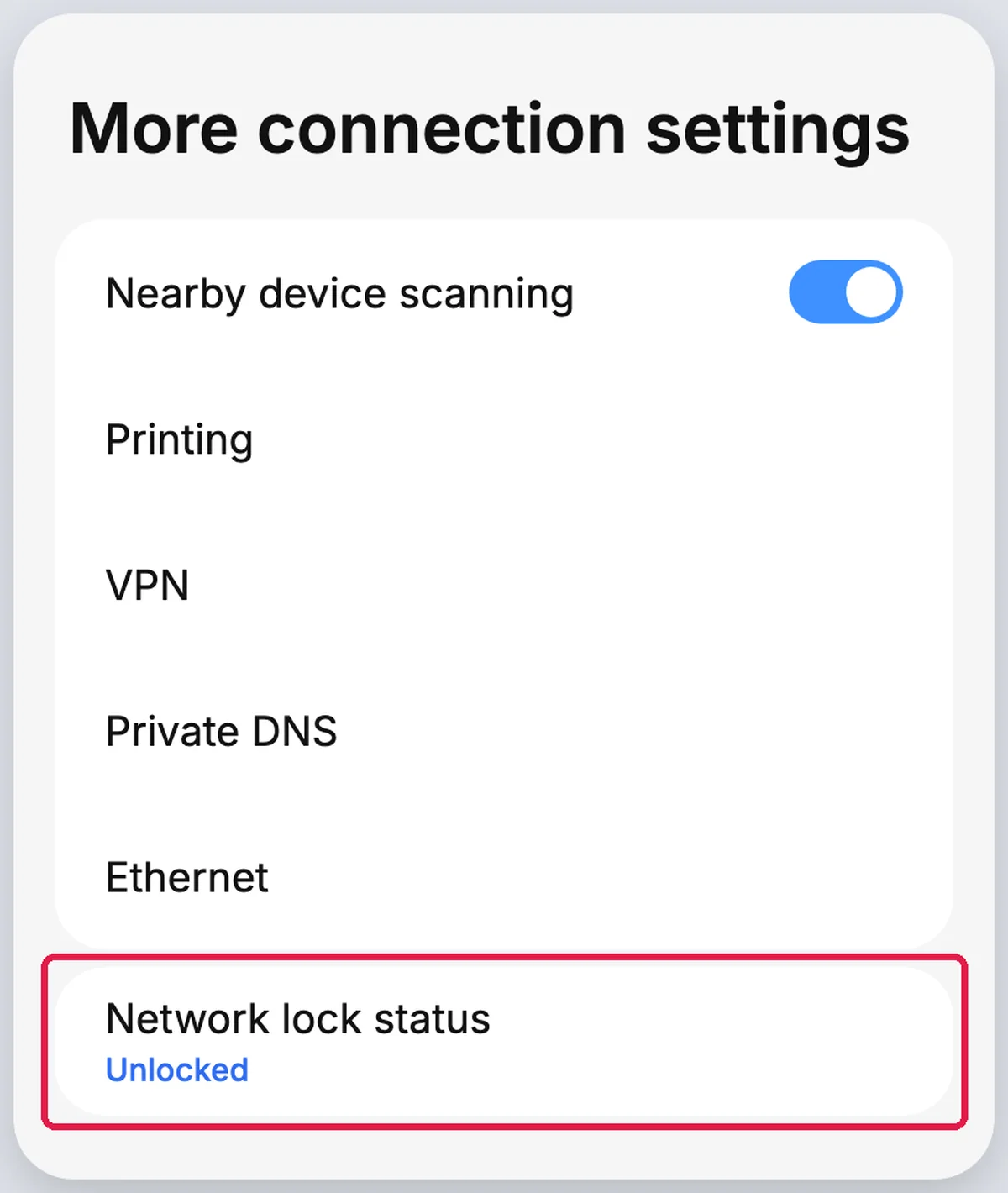
AT&T’s unlock guide says Samsung phones released after September 1, 2025 show a Network lock status line under Settings > Connections > More connection settings. On the Galaxy S26, that screen reads “Unlocked” when no carrier restrictions are detected and “Locked” when the device is restricted to its current carrier. Pixel and older Galaxy models need a different check.
Phone | Where to look | Unlocked reading | Locked reading |
|---|---|---|---|
iPhone, iOS 14 and later | Settings > General > About > Carrier Lock | No SIM restrictions | SIM locked |
Samsung released after September 1, 2025 | Settings > Connections > More connection settings | Unlocked | Locked |
Samsung released before September 1, 2025 (AT&T codes) | Settings > About phone > Software information | Code contains ATT but ends in something else | Code ends in ATT/ATT (originally from AT&T, can be unlocked) |
Google Pixel | Settings > Network & internet > SIMs, network selection off | Networks from multiple carriers (typically) | Networks from only one carrier (likely) |
Source: Apple, AT&T, November 2026
AT&T splits the Samsung check by release date, before or after September 1, 2025, so look up your phone’s exact model first if you are unsure which Galaxy you own.

Samsung Galaxy Phones Released After September 1, 2025
- Open Settings on your Samsung phone.
- Tap Connections, then More connection settings.
- Look for Network lock status and read the word next to it.
AT&T’s Galaxy S26 guide says “Unlocked” means the device should be open to all networks, while “Locked” means it will not recognize other providers. T-Mobile’s instructions use the same menu, Settings > Connections > More Connection Settings, for its Network Unlock option.
Older Samsung Galaxy Phones
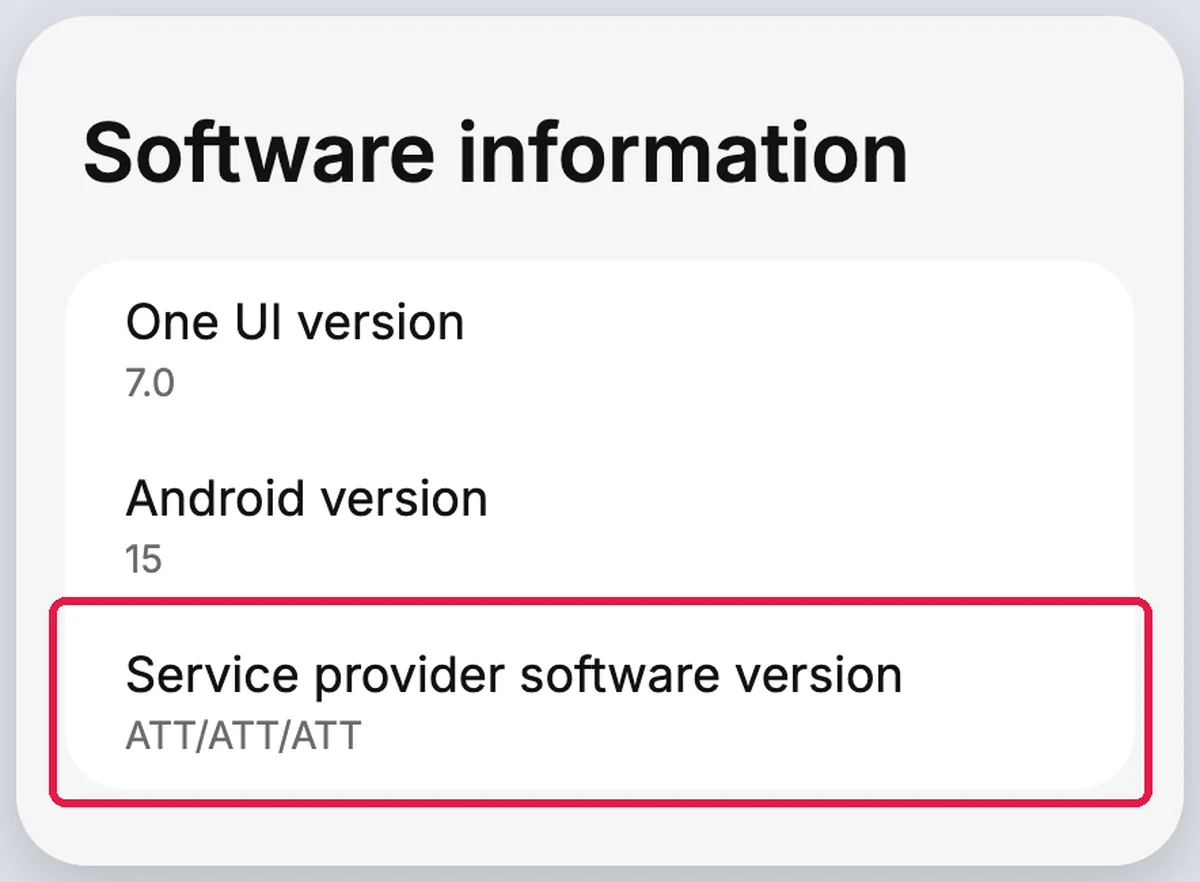
AT&T’s check for Samsung phones released before September 1, 2025 is Settings > About phone > Software information > Service provider software version. AT&T reads the code like this:
- Ends in ATT/ATT: The device was originally from AT&T and can be unlocked.
- Contains ATT but ends in something else: The device was unlocked before coming to AT&T.
- Doesn’t contain ATT: The device isn’t supported by AT&T unlock solutions, and you’ll need to contact the original provider.
Those readings describe AT&T codes only; for a Samsung from another carrier, ask that carrier what its code means.
Google Pixel Phones
Google says all phones in the Google Store come unlocked, and unlocked phones bought there display “Fi” until set up with your carrier. If you bought the Pixel from a mobile service provider, Google says it could be SIM-locked for up to 2 years. For a carrier-bought Pixel, the network scan in the next section gives an answer on the phone itself, with no second SIM.
How to Check If Your Phone Is Unlocked Without a Second SIM
AT&T’s Pixel guide says to turn the Automatically select network toggle off. If your device shows networks from only one carrier, it’s likely locked to that network, and seeing networks from multiple carriers typically means your device is unlocked. AT&T’s Galaxy S26 guide uses the same scan through a Select automatically switch.
On a Google Pixel
On a Pixel, the path runs Settings > Network & internet > SIMs, then a SIM card, then the Automatically select network toggle.
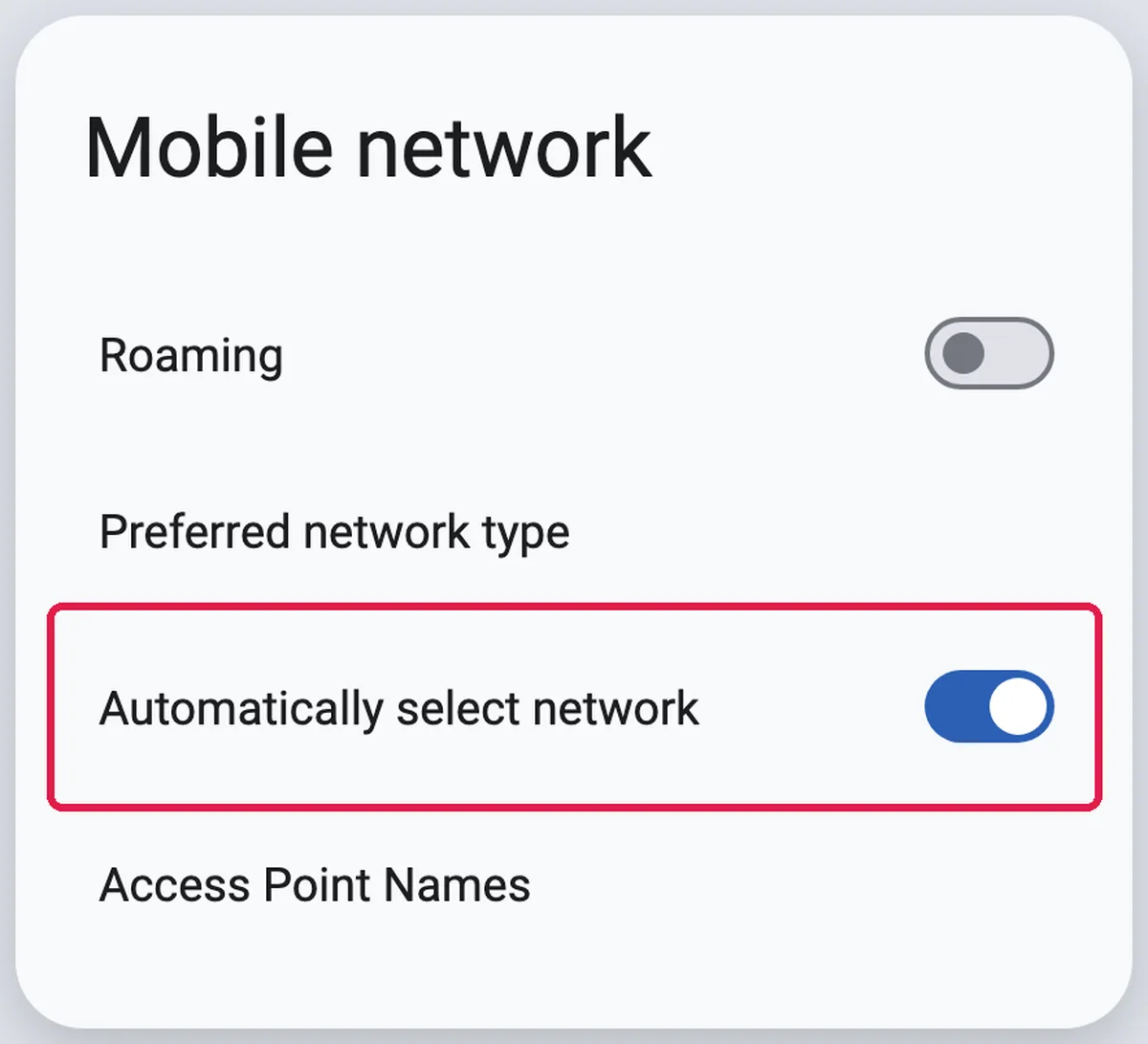
- Open Settings and tap Network & internet.
- Tap SIMs, then select your SIM card.
- Turn Automatically select network off.
- Wait for the list of networks and note which carriers appear.
On a Samsung Galaxy
On the Galaxy S26, the switch sits under Settings > Connections > Mobile networks > Network operators, as Select automatically.
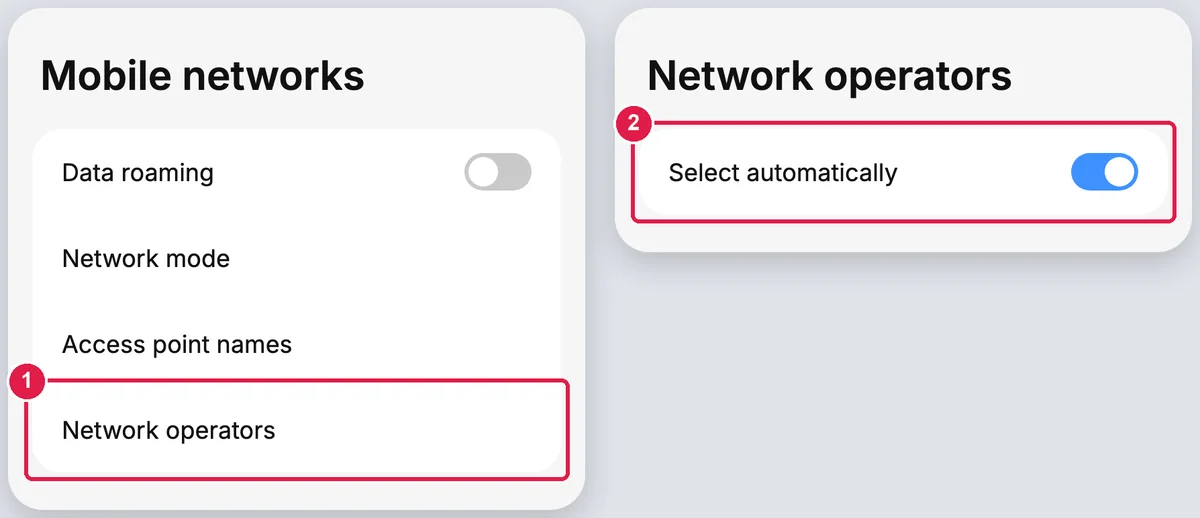
- Open Settings and tap Connections.
- Tap Mobile networks, then Network operators.
- Turn Select automatically off and read the list.
The Pixel scan takes 4 steps and the Galaxy scan 3, with no second card, so it suits anyone without a spare SIM from another carrier. For an AT&T Prepaid device on eSIM, AT&T says you’ll need to request a device unlock, according to your device type.
Turn automatic selection back on: Switch Automatically select network or Select automatically back on after the scan, so the phone goes back to choosing its network by itself.
How to Test With Another Carrier’s SIM
AT&T says you can check an AT&T Prepaid device by inserting a non-AT&T SIM card. If you see a message saying that the SIM card is not compatible with the AT&T network, your device is still locked. A borrowed SIM from any other carrier is enough, and the test takes 4 steps.
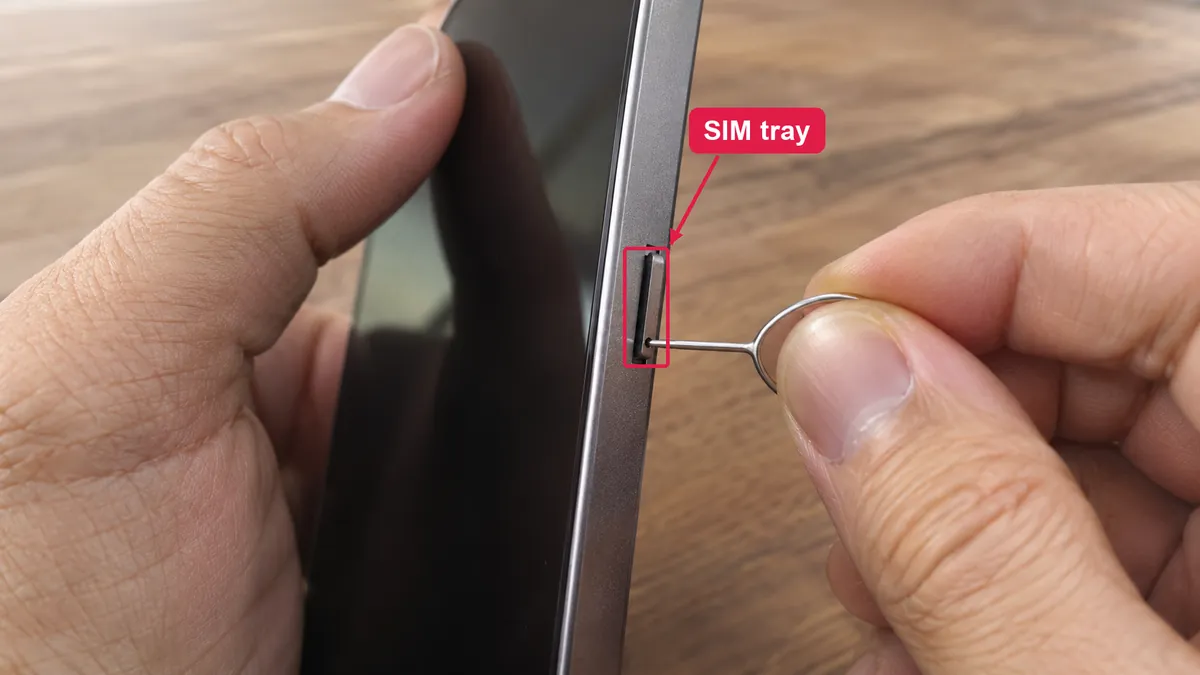
- Turn the phone off and remove your current SIM card. This test needs a SIM tray, and Apple sells some iPhone models as eSIM only, with no tray.
- Insert the SIM card from the other carrier.
- Turn the phone on and read any message about the SIM.
- Put your own SIM back when you finish.
The message quoted above is AT&T’s wording. On a phone from another carrier, confirm what a SIM warning means with that carrier before you act on it.
The FCC warns that an unlock will not make a device fully interoperable, and an unlocked device may support voice services but not data services. A phone that makes calls but will not load data on the new SIM may be unlocked and simply incompatible with that network. A no-service error after the swap can also start on the network side, the same kind of fault behind a mobile network state disconnected message.
How to Check Unlock Status With Your Carrier
AT&T says that if your device is unlocked, your wireless account will say Device unlocked in the Device info. T-Mobile shows the answer under Check device unlock status in your account, and in the Device lock status field of the T-Life / T-Mobile app. Neither check needs the phone in your hand.
AT&T
AT&T adds that an eligible Apple, Samsung, or Google device on an AT&T Wireless plan that meets all the requirements should unlock by itself.
- Sign in to your wireless account.
- Select your device.
- Look for Device unlocked in the Device info.
T-Mobile
Once your device is eligible, T-Mobile says it will automatically unlock the device within 2 business days if it supports remote unlock.
- Log in to your account and open the Accounts page.
- Select the line, then choose Check device unlock status.
- In the app instead, open the Manage tab, select the line and read Device lock status.
Verizon
Verizon says devices bought directly from it are unlocked automatically when purchased at full retail price or when the device financing agreement balance is paid in full. Once a device is unlocked, Verizon will never re-lock it. Use the iPhone, Samsung or network-scan check above to confirm the result on the phone. Apple notes it might take the carrier a few days to complete an unlock request, and you can contact your carrier to check its status.
When will your carrier unlock your phone?
Verizon unlocks postpaid devices automatically at full retail purchase or payoff, but if a Verizon Gift Card is used to pay off a remaining balance, the unlock will be delayed by 35 days. T-Mobile needs the device active for at least 40 days on the requesting line, and AT&T needs a device bought more than 60 days ago and paid in full. Paying off the phone is one condition among several, so a paid-off phone can still read as locked for weeks.
Carrier | Postpaid rule | Prepaid rule |
|---|---|---|
Verizon | Unlocked automatically at full retail price or payoff; 35-day delay on gift-card payoffs | Locked until 365 days of paid and active service |
AT&T | Bought more than 60 days ago and paid in full | 12 months of paid AT&T service |
T-Mobile | Active at least 40 days on the requesting line and paid in full | At least 365 days since activation, or more than $100 in refills and more than 14 days since purchase |
Source: Verizon, AT&T, T-Mobile, November 2026
On Verizon prepaid, the lock comes off automatically after 365 days of paid and active service, while T-Mobile prepaid needs at least 365 days since the device was activated on its network. The chart below puts the day-based rules side by side, with each trigger in the label.
View the data
An FCC order adopted January 12, 2026 noted that the Commission’s rules required Verizon to unlock its handsets 60 days after activation. The waiver will remain in effect until the Commission decides on an appropriate industry-wide approach. On AT&T Prepaid, a device can be unlocked once it has 12 months of paid AT&T service.
Is my phone unlocked if I’m out of contract?
Not necessarily, because finishing the contract makes the phone eligible and the carrier still has to remove the lock. The FCC says participating providers will unlock your postpaid device after you have fulfilled the applicable service contract, device installment plan terms or payment of an early termination fee and are in good standing. Run one of the checks above to confirm.
What to Do If Your Phone Is Locked
Apple says only your current carrier can unlock your iPhone. Within 2 business days after receiving a request, carriers will unlock eligible devices, initiate a request to the manufacturer, or explain why the device does not qualify, according to the FCC. Confirm eligibility first, then ask.
- Match your plan to the wait rule in the carrier table above.
- Clear any balance left on the device.
- Request the unlock through the carrier’s account, app or support line.
- Run the iPhone, Samsung or network-scan check again once the carrier confirms.
CTIA added section 12, its device unlock standards, to the Consumer Code in December 2013 as voluntary standards. T-Mobile’s steps for a Samsung are Settings > Connections > More Connection Settings > Network Unlock > Permanent Unlock, then a restart. On a Pixel, T-Mobile says to download the T-Mobile Device Unlock (Pixel) app from the Play Store and choose Check eligibility. Google says that if you’d like to remove the SIM-lock before the end of your sales contract, you can contact your mobile service provider to discuss your options.
Can I unlock my cell phone myself?
Only through the carrier that locked it, because the unlock is a change in that carrier’s system. T-Mobile lets you start a Permanent Unlock on a Samsung from Settings > Connections > More Connection Settings > Network Unlock, and its Pixel app runs an eligibility check, but both still act on the carrier’s own unlock decision.
How to get an unlocked phone activated?
Google’s steps for an unlocked Pixel are to contact your mobile carrier, then follow their instructions to set up your phone with their service plan. Check compatibility as well, because the FCC says an unlocked device may support voice services but not data services. On an iPhone, you can set up Wi-Fi calling once the new line works.
Conclusion
On an iPhone, “No SIM restrictions” next to Carrier Lock means the phone is unlocked. On a Samsung released after September 1, 2025, the Network lock status line gives the answer, and older models show it through the Service provider software version. A Pixel network scan that shows networks from only one carrier points to a likely lock.
When the check says locked, the fix sits with the carrier, and the wait rules decide how soon it happens. Read your carrier’s rule before you pay off a phone or buy a used one, because paid off and unlocked are not the same thing.
Cite this page
Thakur, T. (2026, November 14). How to Check if Your Phone Is Unlocked (Android and iPhone). TechKV. https://techkv.com/check-if-phone-is-unlocked/
Thakur, Tushar. “How to Check if Your Phone Is Unlocked (Android and iPhone).” TechKV, 14 Nov. 2026, https://techkv.com/check-if-phone-is-unlocked/.
Thakur, Tushar. “How to Check if Your Phone Is Unlocked (Android and iPhone).” TechKV, November 14, 2026. https://techkv.com/check-if-phone-is-unlocked/.
Source: <a href="https://techkv.com/check-if-phone-is-unlocked/">How to Check if Your Phone Is Unlocked (Android and iPhone)</a>, TechKV
References11 sources from 7 publishers
- How to unlock your iPhone for use with a different carrier
- Cell Phone Unlocking
- Device Unlocking Policies
- SIM Unlock Policy
- Learn how to unlock AT&T phones or devices
- Order DA 26-43 (Verizon handset unlocking waiver)
- Google Pixel 10 Pro - Checking whether your phone is carrier locked
- Samsung Galaxy S26 - Checking if your phone is carrier locked




Leave a comment no comments yet