
Google’s latest Android 16 update introduces Audio Sharing with Auracast, enhanced Quick Share, and smarter Gboard AI tools.
TLDR:
- Google adds Audio Sharing via Bluetooth LE Audio and Auracast in Android 16 for Pixel 8 and newer
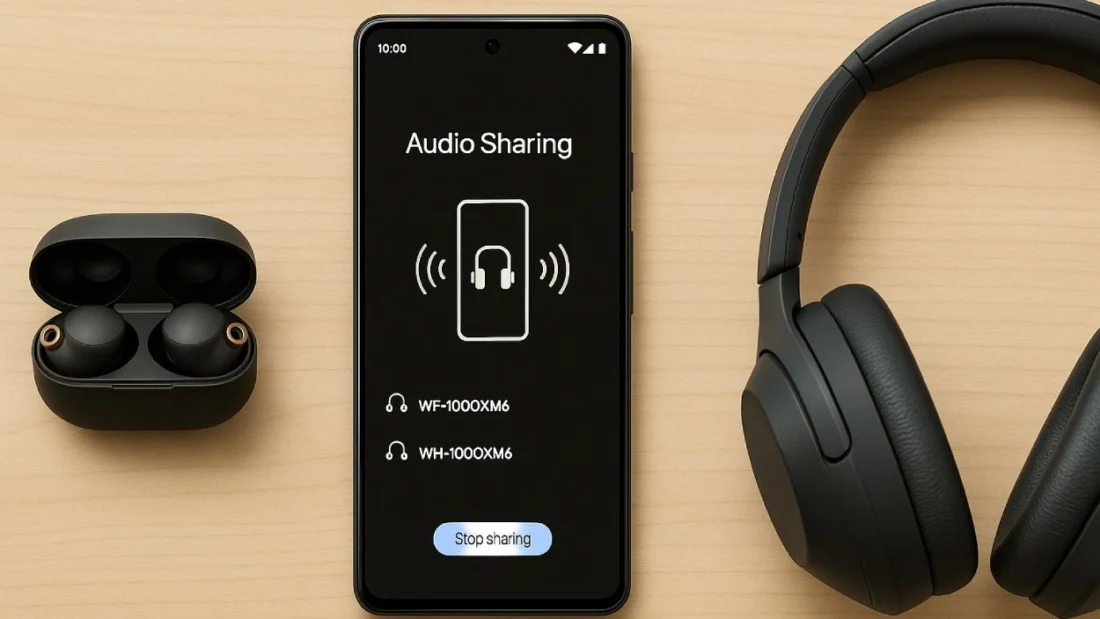
- Multiple wireless headphones can now connect to a single Pixel device to share music or video audio
- Gboard gets AI writing tools for better message drafting and grammar fixes
- Quick Share gets redesigned for simpler and faster file transfers with real-time progress updates
What Happened?
Google is pushing a significant new update for Android users, particularly those with Pixel devices. With Android 16’s latest QPR1 rollout, users now have access to Audio Sharing, a feature powered by Bluetooth LE Audio and Auracast. The update also includes new AI features in Gboard and a revamped Quick Share experience for sending and receiving files.

Android 16 Brings Audio Sharing to Pixel Devices
The new Audio Sharing feature allows users to stream audio from one Pixel phone to multiple Bluetooth headphones. This marks a leap forward in media sharing, making it easy for friends or family members to listen to the same song or watch the same video on their own headphones.
- Pixel phones can now pair with two LE Audio-compatible headphones
- Users can also create a private audio broadcast using Auracast
- Friends can join by scanning a QR code or using Google Fast Pair
This group-listening experience is ideal for traveling together, sharing content during commutes, or even public settings like gyms and museums, where broadcasts can reach multiple people at once.
Supported Devices and Limitations
Not every device is compatible. Both the phone and the headphones must support LE Audio and Auracast.
- Supported phones: Pixel 8 series and newer (excluding Pixel 8a and Pixel 9a)
- Supported headphones include Sony’s:
- LinkBuds S, LinkBuds Open, LinkBuds Fit
- WF-1000XM5, WF-1000XM6
- WH-1000XM6 over-ears
- InZone gaming headsets
- Other brands like Samsung and Xiaomi also offer compatible earbuds
Interestingly, Google’s own Pixel Buds 2 are currently not confirmed to work, even though they support LE Audio on paper.
The technology is backed by LE Audio’s LC3 codec, which delivers high-quality sound while consuming less power. This is especially beneficial for earbuds and modern hearing aids, which are also compatible.
Smarter Gboard with AI Writing Tools
Google is also expanding its AI push with Gboard enhancements. Users can now tap into on-device AI to rewrite messages, fix grammar and spelling, or choose between formal, expressive, or concise tones.
- Entire messages can be proofread or polished with a single tap
- All processing happens locally, so user privacy stays protected
Redesigned Quick Share
Quick Share has also been upgraded with a more intuitive interface.
- Easily toggle between sending and receiving
- Preview files before sharing and open received content immediately
- A new progress indicator shows real-time transfer percentage
These changes make file sharing smoother and more transparent, perfect for everyday use.
What TechKV Thinks?
I love seeing this kind of practical innovation from Google. The ability to share audio wirelessly across multiple headphones is something users have been waiting on for years, and it’s finally here in a way that feels seamless and smart. The use of QR codes and Fast Pair makes it genuinely user-friendly, not just a tech gimmick. Gboard’s new AI features are also a quiet game-changer for anyone who writes a lot on their phone. These updates show that Google is not just adding features for the sake of it, but actually thinking about how we use our phones in real life. This is the kind of thoughtful tech that actually improves daily experience.
Cite this page
Namase, R. (2025, September 4). Android 16 Brings Audio Sharing and Smarter Gboard to Pixel Phones. TechKV. https://techkv.com/android-16-audio-sharing-auracast-update/
Namase, Rajesh. “Android 16 Brings Audio Sharing and Smarter Gboard to Pixel Phones.” TechKV, 4 Sep. 2025, https://techkv.com/android-16-audio-sharing-auracast-update/.
Namase, Rajesh. “Android 16 Brings Audio Sharing and Smarter Gboard to Pixel Phones.” TechKV, September 4, 2025. https://techkv.com/android-16-audio-sharing-auracast-update/.
Source: <a href="https://techkv.com/android-16-audio-sharing-auracast-update/">Android 16 Brings Audio Sharing and Smarter Gboard to Pixel Phones</a>, TechKV
Leave a comment no comments yet