


On an iPhone, the model number sits in the Settings app under General, then About, according to Apple. On a Samsung phone, it sits under Settings, then About phone, per Samsung’s support page. A Pixel phone from Google lists it under About phone, on the “Model” line further down the screen. If you are holding a phone and wondering what kind of phone is this, start on that screen, whichever side of the iPhone vs Android user split it sits on.

On iPhone, the value to the right of Model Number is the part number, and tapping it shows the model number. Even a handset that refuses to boot carries its identity elsewhere. According to GSMA, the first 8 digits of an International Mobile Equipment Identity (IMEI) number are the Type Allocation Code (TAC). A TAC identifies the device model and brand owner.
Before you start: You need the phone itself, unlocked, its original box, or the Apple Account or Google Account it was signed in to.
Key Takeaways
- On iPhone, open Settings, tap General, then About; tap the part number beside Model Number to see the model number.
- On a Samsung phone, Settings, then About phone, shows the model number, IMEI and serial number.
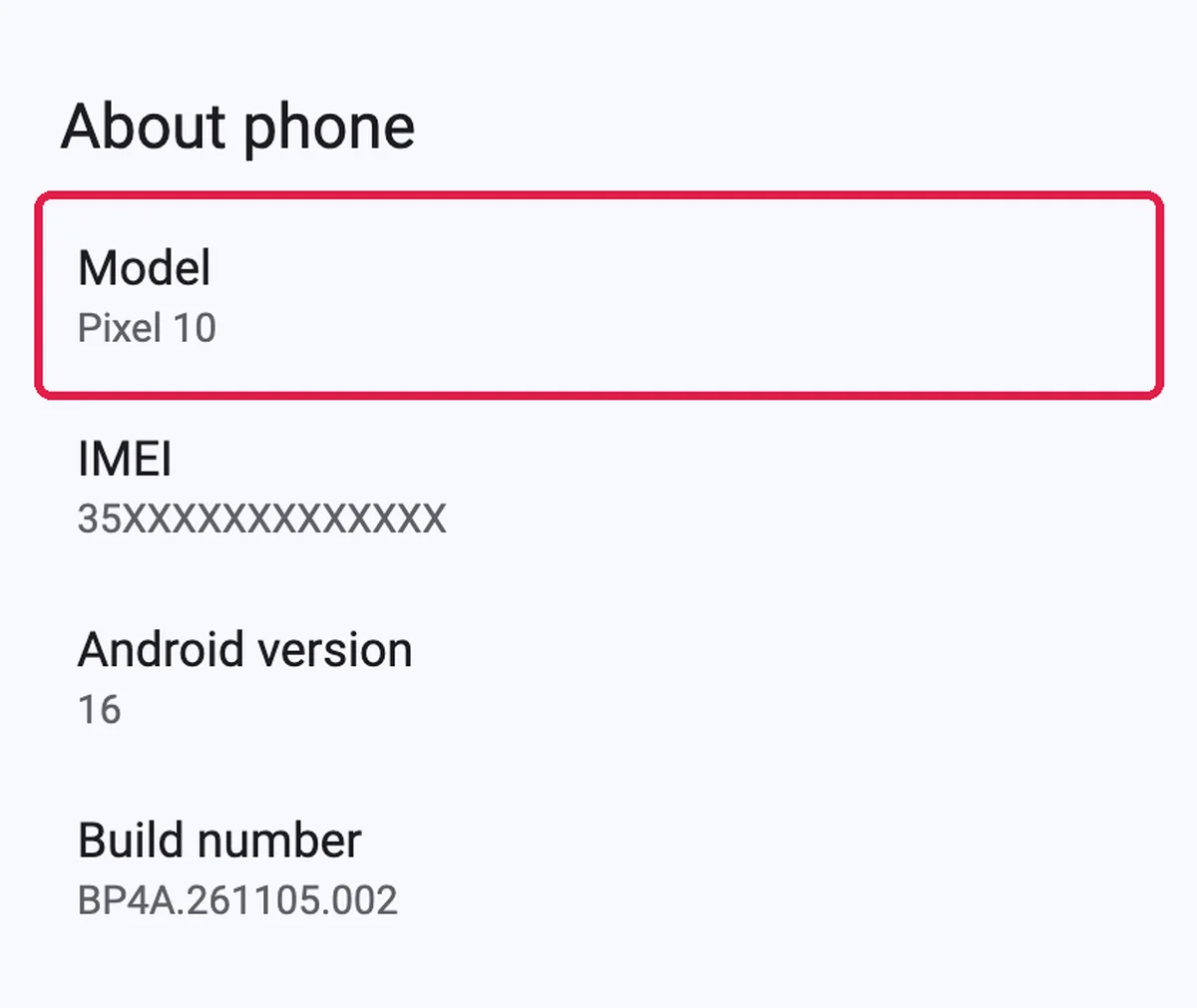
- Pixel owners scroll down the About phone screen in Settings until they find “Model”.
- Apple lists iPhone 17 Pro Max as A3257 in the United States and Puerto Rico and A3527 in China mainland.
- According to GSMA, the first 8 digits of an IMEI are the TAC, and only one device model may be allocated to a TAC.
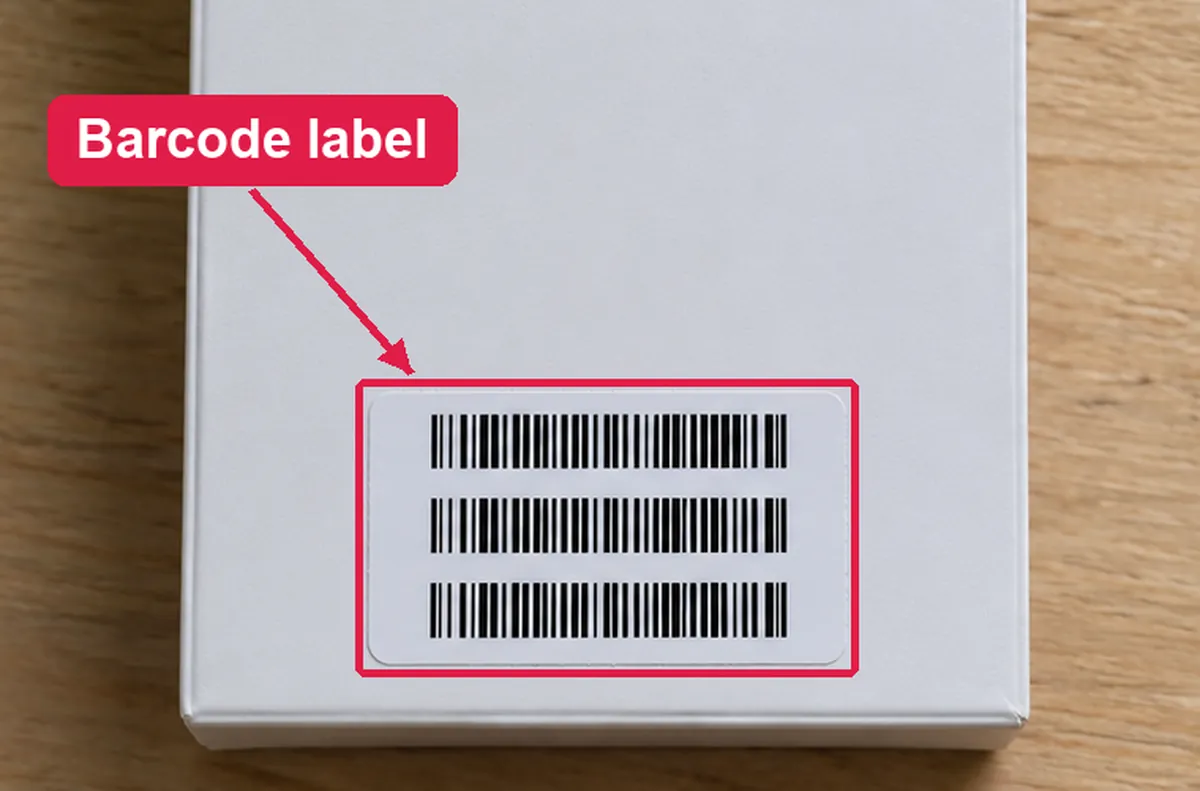
- Apple prints the serial number and IMEI on the barcode of the original packaging.
- Google lists when Pixel models went on sale on the US Google Store, from Pixel 9a in April 2025 to the Pixel 11 series in August 2026.
How to Check Your Phone Model in Settings
Apple tucks the iPhone identifier inside Settings, under General and About. Samsung shows the model number, IMEI and serial number together on its About phone screen. Google’s Pixel steps use the same About phone screen, scrolled down to the “Model” line.
On an iPhone
Whatever kind of phone this is, the check takes 4 steps on iPhone and 3 on a Samsung or Pixel.
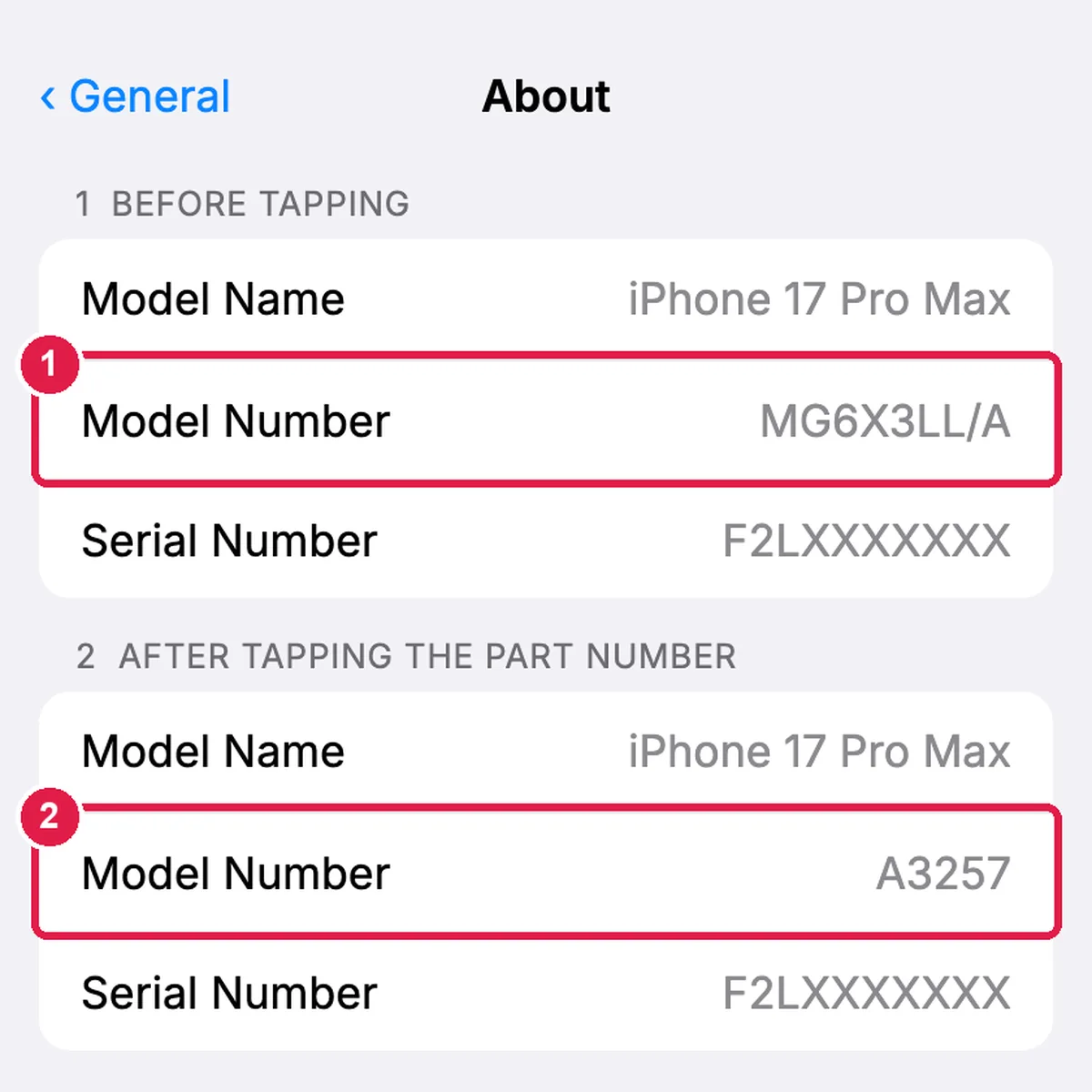
- Open the Settings app, then tap General.
- Tap About.
- To the right of Model Number sits the part number.
- Tap the part number to see the model number.
- Find that model number in Apple’s identification list, where the code becomes a recognizable product name.
On a Samsung Galaxy
Samsung notes that available screens and settings may vary by wireless service provider, software version and phone model.
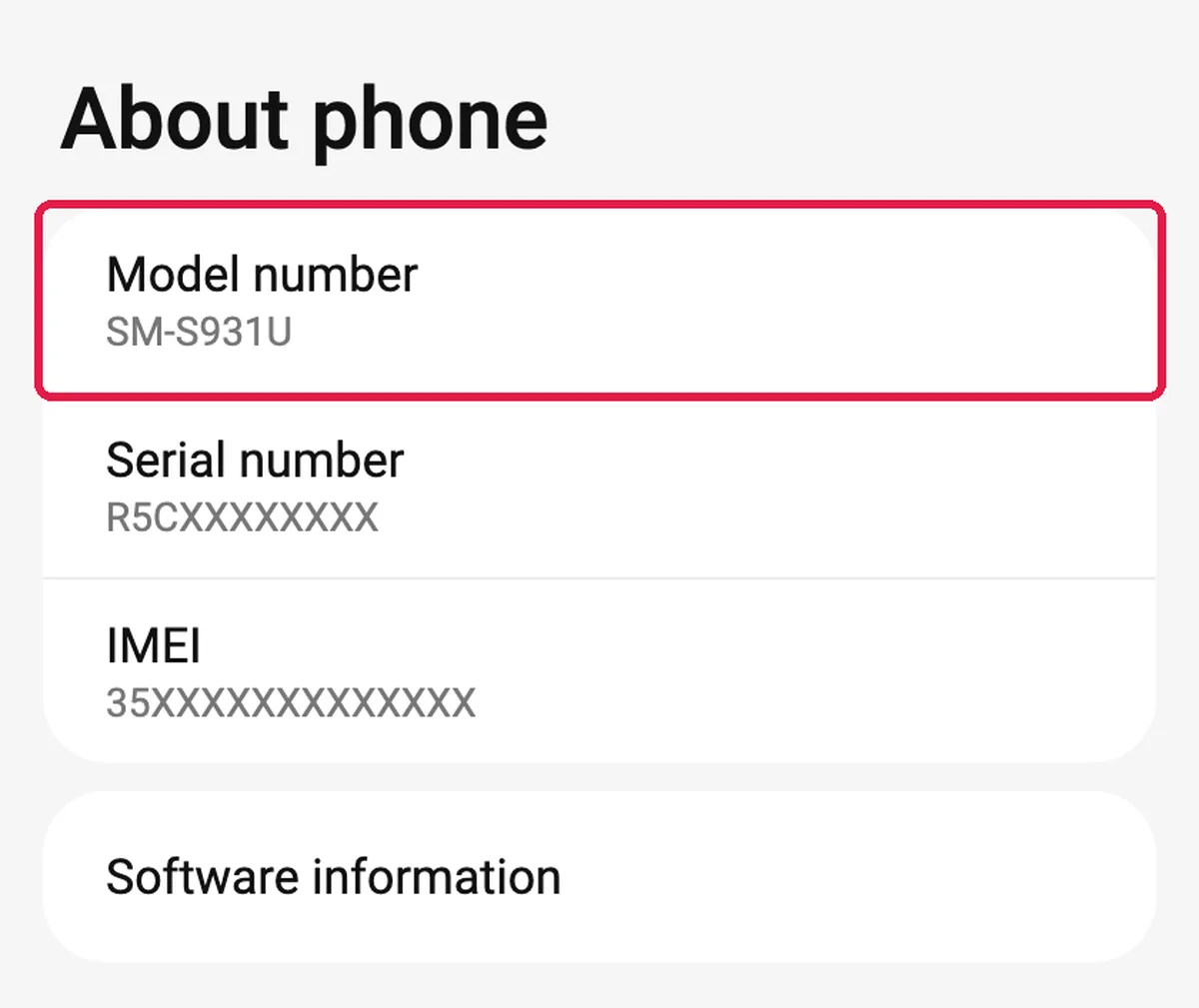
- Navigate to Settings on the phone.
- Then tap About phone, or About tablet on a tablet.
- Read the model number on the About phone screen.
On a Google Pixel (Google’s Android Steps)
- Open your phone’s Settings app.
- Then tap About phone.
- Scroll down until you find “Model”.
Google’s Android support page gives the same starting point for Android devices in general: Open Settings, then tap About phone or About tablet. Of the iPhone and Android paths below, the iPhone one takes an extra step.
Phone | Where to look | What you see |
|---|---|---|
iPhone | Settings > General > About | Part number beside Model Number; tap it for the model number |
Samsung Galaxy | Settings > About phone | Model number, IMEI and serial number |
Google Pixel | Settings > About phone | “Model” and “IMEI” further down the list |
Android (Google’s steps) | Settings > About phone > Android version | Android version, security update, Google Play system update and build number |
Source: Apple, Samsung, Google
How do I find what make and model my phone is?
Head to the About page inside Settings. On iPhone, look under General, then tap the value beside Model Number to reveal it. On a Pixel, About phone lists “Model” further down. The make is the brand on the back of the phone and on its startup screen, so the About screen settles the model.
Model Name vs Model Number on iPhone
Apple explains that Settings first displays a part number beside Model Number, and a tap reveals the model number. Apple’s identification page then asks you to find that model number in its list, whose entries pair each code with a product name, launch year and regional variants. If the code you copied is not on Apple’s list, you probably copied the part number.
On an iPhone 7 or earlier, you can also find the model number on the back of the device. Model number A3447, for example, is iPhone Duo as sold in the United States and Puerto Rico, introduced in 2026. Apple’s entry also lists a 5.4-inch outer display and a 7.6-inch inner display for iPhone Duo, handy for confirming you hold the right device.
What is the name of my model?
Match the code against Apple’s catalog and the marketing name appears beside it. Model number A3257, for example, belongs to iPhone 17 Pro Max (United States and Puerto Rico version), introduced in 2025 with a 6.9-inch display. On a Pixel, the name is the “Model” line under About phone.
Why One iPhone Has Several Model Numbers
Apple lists iPhone 17 Pro Max as A3257 in the United States and Puerto Rico, A3527 in China mainland, and A3526 in other countries and regions. A separate number, A3525, covers places including Canada, Japan and Mexico. That is 4 model numbers for one phone, each marking the market it was built for.
That makes the model number a quick check on a used or imported iPhone. An iPhone 17 Pro Max reading A3527 was built for China mainland, whatever the listing says. A regional model number says nothing about a carrier lock, so a used import also needs an unlock check.
iPhone model | United States, Puerto Rico | Japan | China mainland | Other countries and regions |
|---|---|---|---|---|
iPhone 17 Pro Max | A3257 | A3525 | A3527 | A3526 |
iPhone Air | A3260 | A3516 | A3518 | A3517 |
iPhone 17e | A3575 | A3575 | A3635 | A3634 |
iPhone Duo | A3447 | A3719 | A3721 | A3720 |
Source: Apple
The split varies from handset to handset. iPhone Air has its own Japan model number, A3516, and uses A3518 in China mainland. iPhone 17e, by contrast, uses A3575 for the United States, Puerto Rico, Canada and Japan alike. iPhone Duo, introduced in 2026, uses A3447, A3719, A3721 and A3720 across its regions.
Can IMEI tell the model of a phone?
Under GSMA rules, the first 8 digits of an IMEI are the TAC, allocated to a specific device model and brand owner. Only one device model may be allocated to a TAC, so yes, those opening digits pinpoint a single handset design before you reach the serial portion.
The IMEI also identifies the individual unit, and every IMEI must be globally unique. GSMA allows one million devices or units per TAC, and a new TAC is allocated after one million units. A best-selling phone therefore carries several TACs. Three quick routes to the IMEI:
- On iPhone, open Settings, tap General, tap About, and scroll down to IMEI/MEID.
- On a Samsung phone, dial *#06# to display the IMEI and serial number; this only works when supported by your carrier.
- On a Pixel, open Settings, tap About phone and scroll down until you find “IMEI”.
Like the Android engineer mode codes, *#06# runs from the Phone app. Google’s help page adds: A dual SIM phone has one IMEI number for each slot, IMEI 1 and IMEI 2.
You do not need an IMEI lookup site to learn the model. The About screen shows both.
What kind of phone is this if it won’t turn on?
Apple prints the serial number and IMEI on the barcode of the original packaging, and you can view your Apple Account device list on the web from a Windows PC or Android device. Either route works on a dead or locked handset. If the phone has a removable battery, Samsung says to look under or below the battery for the IMEI or serial number.
Google’s account page lists devices where you are signed in now or were in the last few weeks. A phone that powers on but freezes before Settings opens is a glitching phone to fix first.
- Check the original box: The barcode carries the serial number and IMEI.
- On an iPhone 7 or earlier, look for the model number on the back of the device. iPhone 14 models and later don’t have an IMEI engraving.
- Sign in to your Apple Account on the web and select Devices; click View Details if your devices don’t show right away.
- In your Google Account, tap Security & sign-in, then select Manage all devices on the Your devices panel.
- For a Pixel, the Your Devices page lists serial numbers, IMEIs and models for most Made by Google devices.
- Check your carrier’s website, where account details may list the IMEI, or your bill of sale or contract.
What model is this phone if it has no name on it?
Skip the logo hunt and read the IMEI. On a Samsung, dialing *#06# displays the IMEI when your carrier supports it, and the first 8 digits of that number, the TAC, identify the device model. On an iPhone 7 or earlier, the model number is printed on the back.
How to Tell How Old Your Phone Is
Apple’s identification page gives a year introduced for iPhone models, such as 2025 for iPhone 17 Pro Max. Google lists the month a Pixel became available on the Google Store in the US, such as August 2025 for Pixel 10.
View the data
Pixel 11 models reached the US Google Store in August 2026, and Pixel 10a in March 2026. On the Apple side, iPhone Duo carries a year introduced of 2026. Both dates mark when the model launched, not when your unit was bought; your receipt is the better record for that.
How to Find Your Android Version and Build Number
Google’s Android support page puts the Android version, Android security update, Google Play system update and build number under Settings, About phone, Android version. It takes 3 steps, and a support agent may ask for these fields.
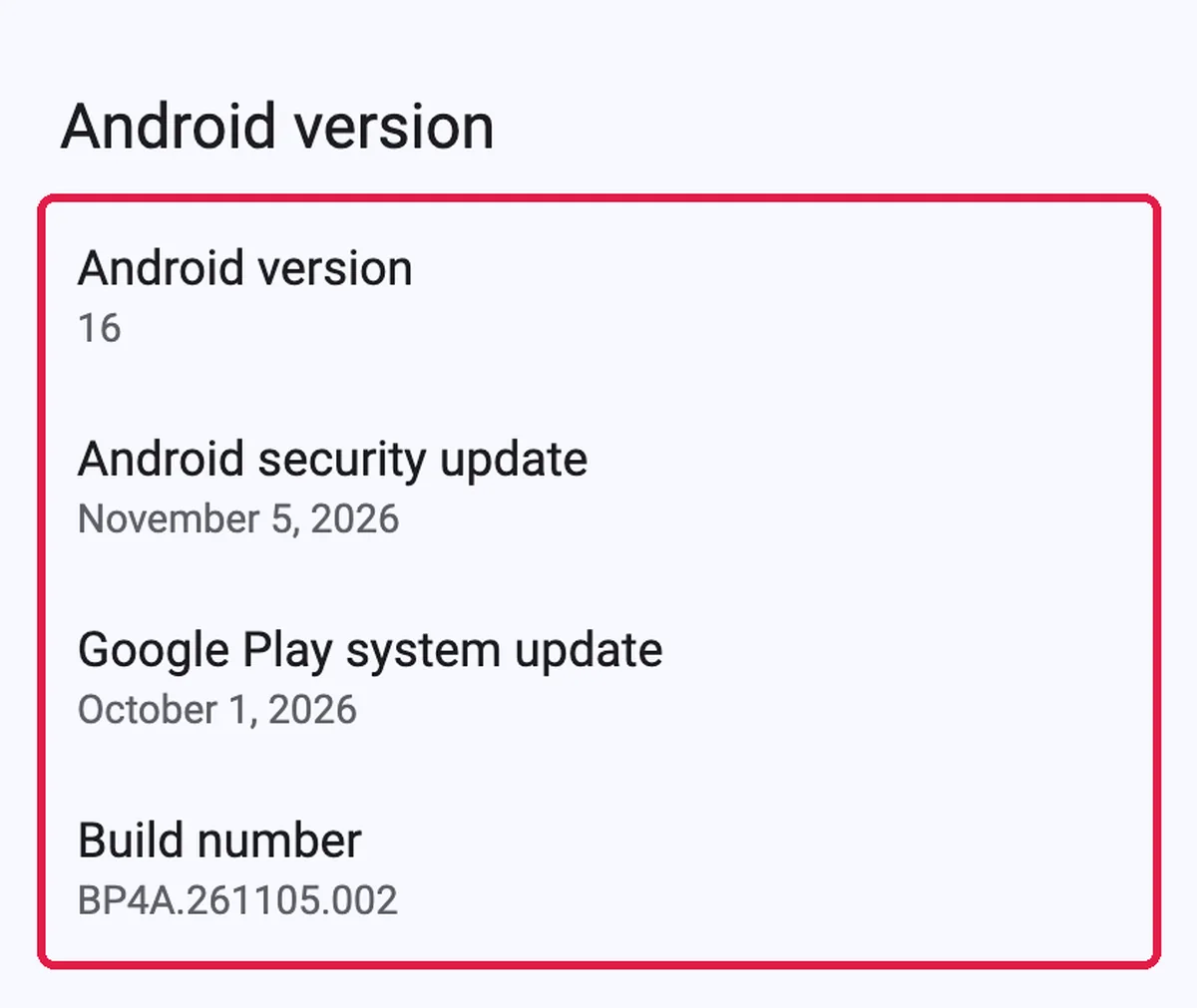
- Open your device’s Settings app.
- Then tap About phone or About tablet, then Android version.
- Find your Android version, Android security update, Google Play system update and build number.
Common Mistakes When Checking Your Phone Model
Apple places the part number to the right of Model Number, so copying that code without tapping it gives you the wrong reference: the part number, not the model number. Watch for these 5 other slips before you order a case or a repair part.
- Regional variants differ: iPhone 17 Pro Max is A3257 in the United States and A3527 in China mainland.
- Dual SIM handsets carry a separate IMEI for each slot, labeled IMEI 1 and IMEI 2, Google notes.
- Samsung’s *#06# code only works when supported by your carrier.
- iPhone 14 models and later have no IMEI engraving.
- Samsung warns that its menus can differ by carrier, software version and phone model, so a carrier-branded Galaxy may not match screenshots taken on an unlocked one, and the model line can sit in a slightly different spot.
Conclusion
The model number lives in Settings: General, then About on iPhone, and About phone on a Samsung phone. On iPhone, a tap on the part number reveals the model number, which the maker’s list turns into a name, region and launch year.
When the phone will not cooperate, the box, your Apple or Google account, and the IMEI fill the gap. The first 8 digits of the IMEI, the TAC, identify the device model, so even a silent handset can be traced to its exact design.
Cite this page
Thakur, T. (2026, November 26). What Phone Do I Have? How to Find Your Phone Model. TechKV. https://techkv.com/what-phone-do-i-have/
Thakur, Tushar. “What Phone Do I Have? How to Find Your Phone Model.” TechKV, 26 Nov. 2026, https://techkv.com/what-phone-do-i-have/.
Thakur, Tushar. “What Phone Do I Have? How to Find Your Phone Model.” TechKV, November 26, 2026. https://techkv.com/what-phone-do-i-have/.
Source: <a href="https://techkv.com/what-phone-do-i-have/">What Phone Do I Have? How to Find Your Phone Model</a>, TechKV
References10 sources from 4 publishers
- Find the model number of your iPhone, iPad, or iPod touch
- Identify your iPhone model
- Find the serial number or IMEI on your iPhone, iPad, or iPod touch
- Review devices signed in to your Apple Account
- Find your Samsung phone or tablet's IMEI, model, or serial number
- Find your device serial number & model
- Check & update your Android version
- See devices with account access
- Find when your Pixel device became available
- GSMA TAC Allocation and IMEI Programming Rules for Device Brand Owners and Manufacturers, Training Guide v1.0






Leave a comment no comments yet